Data enrichment credits and top-ups
Pipedrive’s data enrichment feature is powered by Surfe (by Growster SAS), a third-party sales prospecting platform. Pipedrive provides the technical interface for this feature, but does not source, scrape or own the data.
Monthly credit allocation
Each month, Pipedrive provides a fixed number of data enrichment credits based on your plan. These credits reset on the first day of every billing cycle.

You can use your monthly credits to enrich person or organization contact details.
If you‘ve used up all of your monthly credits before the credit renewal cycle, you can either:
- Wait until the next billing cycle to continue enriching data
- Purchase additional top-up credits to cut the waiting time
How top-up credits work
If you‘re trying to enrich data after you’ve used up your monthly credits, you can supplement your subscription with additional data enrichment credits. There are two ways to purchase additional credits.
Adding to insufficient credits
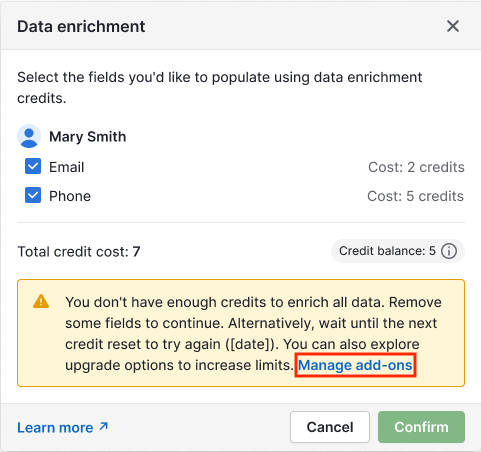
If you have some credits left, but not enough to enrich the data you need, you‘ll see a pop-up notification informing you of your options. Click “Manage add-ons” to go to the Top-ups page.
Reaching your monthly credit limit
If your company has already exhausted its available monthly credits, you’ll see a pop-up inviting you to increase your credit limit.
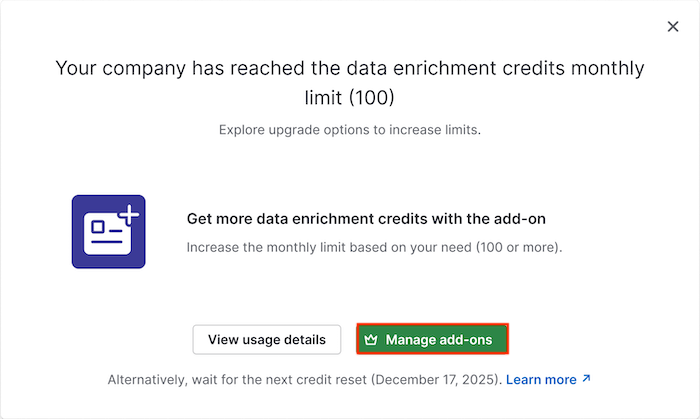
Click “Manage add-ons” to go to the Top-ups page.
Choosing your credit amount
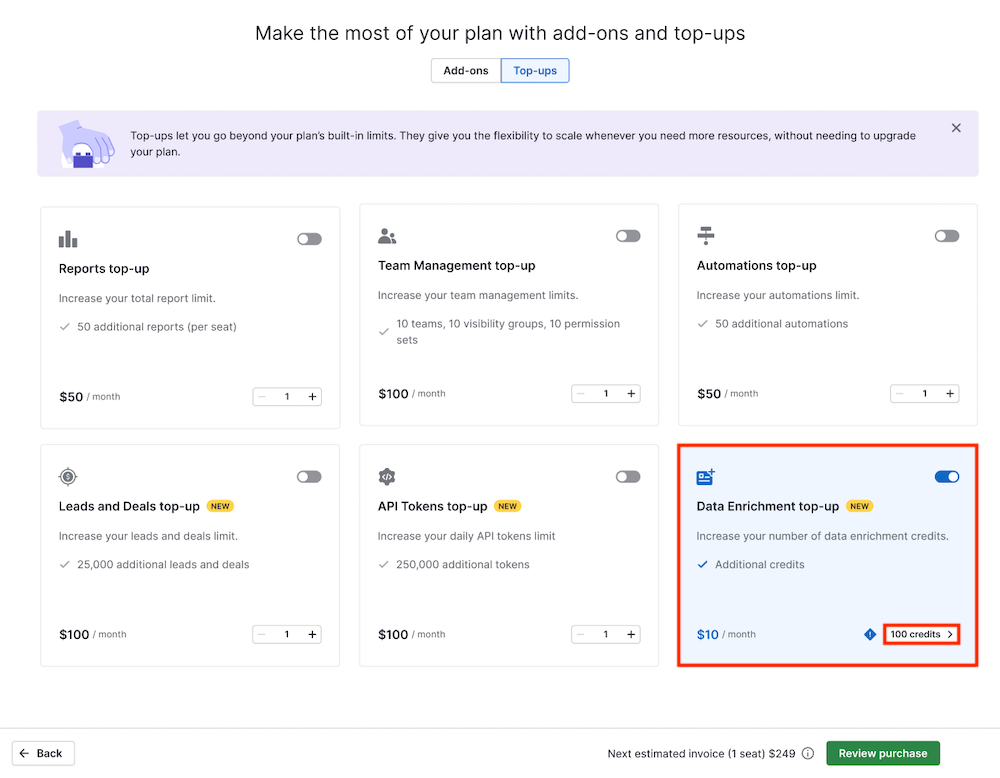
Find the Data Enrichment top-up option and click the “100 credits” button to choose your credit amount.
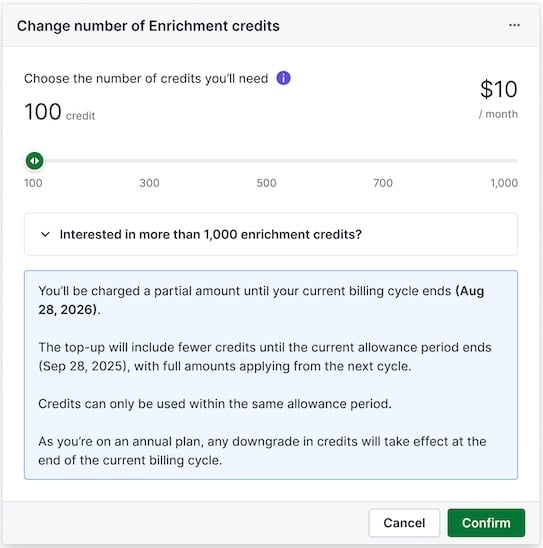
Next, drag the slider to set the amount of monthly credits you want to add to your subscription. You can choose any amount of credits between 100 and 1,000 in increments of 100. Click “Confirm” to finalize your purchase.
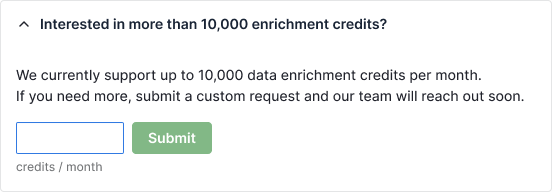
The default top-up limit is 10,000 credits, but you can apply for a higher limit by expanding the section “Interested in more than 1,000 enrichment credits?” and submitting a request with the amount of credits you require.
After purchasing a top-up, the number of credits you’ll immediately be charged for and have access to will depend on the stage you’re at in your billing cycle.
For example, if you’re halfway through your billing cycle, you’ll receive and pay for half of the top-up credits immediately.
The additional credits will appear when your billing cycle renews, and you’ll be charged the additional cost then.
Frequently asked questions
Who provides enrichment data?
The data enrichment feature utilizes Surfe (by Growster SAS), a third-party sales prospecting platform.
Pipedrive provides only the technical interface for data enrichment and does not source, scrape or own the data.
Surfe acts as an independent data controller for its sourcing operations (with a Legitimate Interest Assessment and opt-out mechanism implemented) and as a data processor on behalf of third parties.
Third-party data sources may include publicly available information, customer-provided data and data obtained through integrations or commercial data providers in compliance with applicable data protection laws.
For further information, see Surfe’s privacy policy.
What are your responsibilities?
Since you‘re the data controller for the personal data you process in Pipedrive, you’re responsible for ensuring your use of this data complies with GDPR and other applicable privacy and anti-spam laws. This includes:
Defining a valid legal basis for collecting and using this data
Informing data subjects about your use of their information
Honoring opt-out requests and removing contacts who don‘t wish to be contacted
Complying with any additional requirements under your specific jurisdiction
What happens to unused top-up credits?
Unused monthly and top-up credits expire at the end of each billing cycle and don’t carry over to the following month. On your company’s billing date, expired credits will be removed, and a new monthly credit pool will be added based on your current limit.
Can I get a refund for unused credits?
No – all top-up credit purchases are non-refundable.
Who can purchase enrichment credit top-ups?
Only users with account settings access (admin users) can buy additional credits. Other users can view the credit balance in the Usage page, but can’t make purchases.
Is there a limit to the number of top-ups I can buy per month?
Yes. The default top-up limit is 10,000 credits per billing cycle. If needed, you can request a higher limit.
Where can I see my enrichment credit balance?
You can view your current balances for monthly and top-up credits on the Usage page.
Do top-ups work like a one-time boost or a subscription?
Top-ups are a recurring subscription. When you purchase a top-up for additional credits, your monthly allowance increases until you remove it via the Top-ups page. For example, if your plan includes 100 credits and you buy 200 more, your new monthly limit will be 300 credits.
You can remove or change your top-up credit amount at any time until your next renewal date. After removing a top-up, you‘ll no longer receive or be charged for additional credits from your next renewal date onward.
When are new credits added to my account?
A percentage of your credits will be added immediately after purchase, but the full credit amount may be prorated based on the remaining time in your current billing cycle. This means that the full amount will be available starting on your next billing date.
Was this article helpful?
Yes
No