Data enrichment
Pipedrive‘s data enrichment is powered by Surfe (by Growster SAS), a third-party sales prospecting platform. When you request enrichment, Surfe provides additional publicly available information about organizations or people and adds it to the selected record in your account.
Pipedrive provides the technical interface for this feature, but does not source, scrape or own the data. This feature can support better scoring, segmentation, ideal customer profile (ICP) matching and outreach.

Where can I find the Data Enrichment feature?
You can trigger the data enrichment in the deal and contacts detail views.
If there are fields that can be populated through enrichment, the feature will add them directly.

You can also click on ”enrich data” on the respective field information.

How does Data Enrichment work?
Based on your customer’s email domain, company website or company LinkedIn account, Surfe (by Growster SAS) looks up publicly available information and displays it in Pipedrive‘s interface to enrich the selected person or organization contact.
The data you can look up depends on the type of enrichment and the Pipedrive plan you’re on.
Type | Data | Pipedrive plan |
Firmographic enrichment | Organization data | Premium |
Contact enrichment | Organization and people data | Ultimate |
Types of enrichment
Enriching a single organization
To enrich a single organization, make sure you’ve entered the correct organization name and at least one of the following:
- A linked person with a work email address
- A filled-in website field
- A populated LinkedIn profile
If they’re not provided, the system will prompt you to populate the required fields before enrichment can proceed.
Fields you can enrich for organizations:
- Address (can also be used for filtering by city or country)
- Industry
- Employee count
- Annual revenue
- LinkedIn profile
- Website
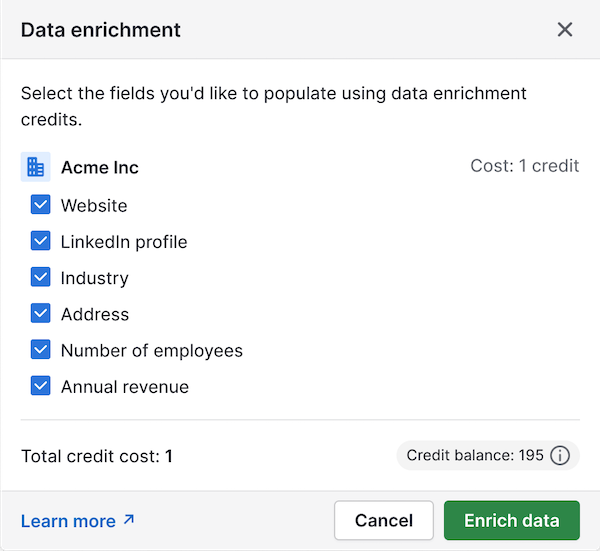
Once you confirm the fields, you’ll see a summary of the information found.

Enriching a single person
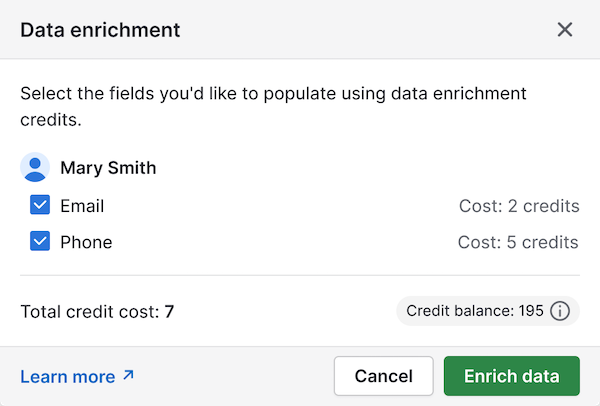
You can enrich the following fields for a person:
- Phone number
- Linked them to the correct organization
- Filled in their email address
- Added their LinkedIn profile
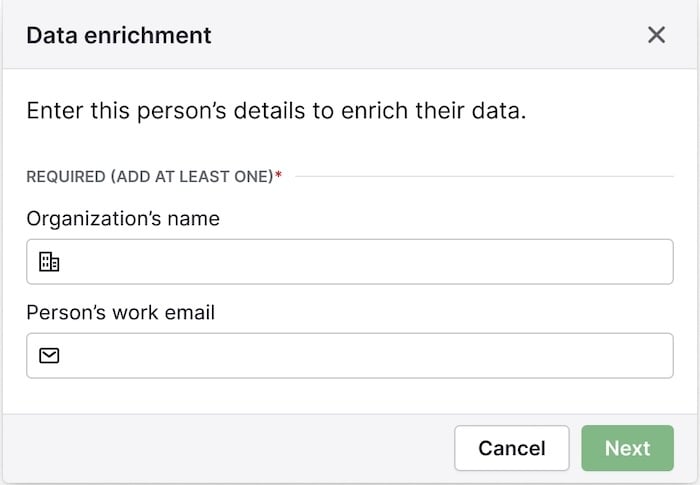
To start email enrichment, you’ll need to have filled in the person’s name and either:
- Linked them to the correct organization
- Their LinkedIn profile
Bulk enrichment for people and organizations
With bulk enrichment, you can enrich up to 100 people and/or organizations at once from the list view in the Contacts tab.
This is useful when you want to quickly update multiple contact records at once, rather than enriching each one individually.
How to enrich in bulk:
Go to Contacts and select People or Organizations. Use filters or search to locate the records you want to enrich.
Select the people and/or organizations from the list view you want to enrich, up to a maximum of 100.
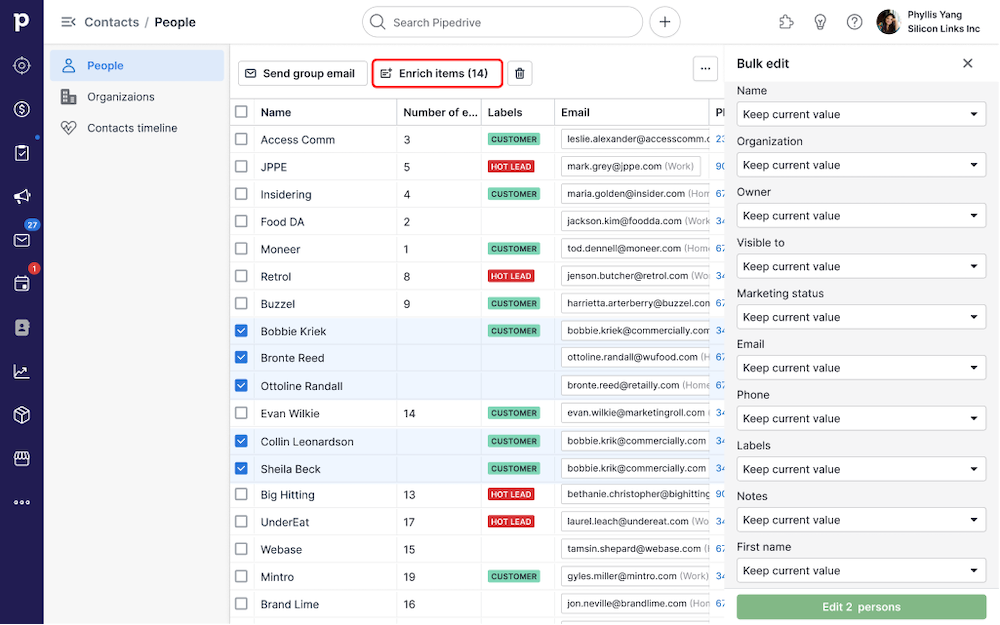
Select the “Enrich items” button and review the fields suggested for enrichment.
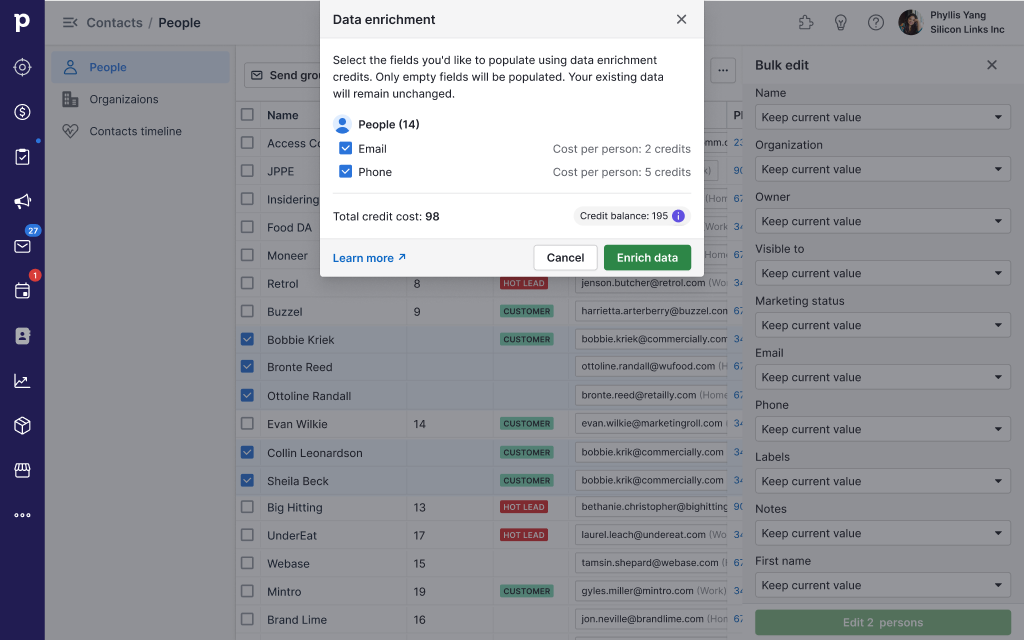
Confirm clicking on “Enrich data” to start enriching.
At the end of the enrichment process, you‘ll see an overview screen with the data that has been added to your contacts.
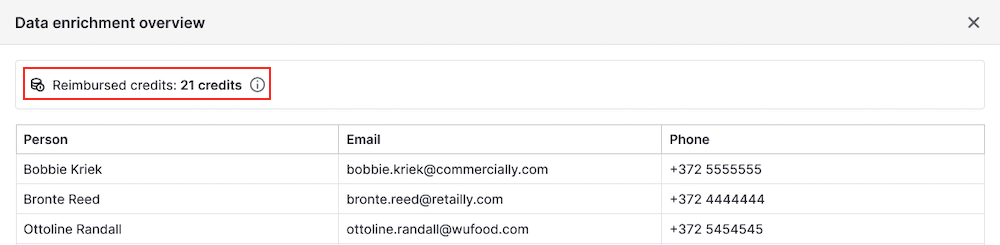
It will also show how many credits were reimbursed, which happens if the data was already filled in, or if the enrichment was unsuccessful.
Enrichment credit usage
Enrichment uses monthly credits allocated per company.
- Each organization enrichment costs one credit.
- Each email enrichment costs two credits.
- Each phone enrichment costs five credits.
- Credits are refreshed monthly based on your plan.
- Once your monthly credits are used up, you can purchase credit top-ups.
Is Data Enrichment GDPR compliant?
Who provides enrichment data?
The data enrichment feature utilizes Surfe (by Growster SAS), a third-party sales prospecting platform.
Pipedrive provides only the technical interface for data enrichment and does not source, scrape or own the data.
Surfe acts as an independent data controller for its sourcing operations (with a Legitimate Interest Assessment and opt-out mechanism implemented) and as a data processor on behalf of third parties.
Third-party data sources may include publicly available information, customer-provided data and data obtained through integrations or commercial data providers in compliance with applicable data protection laws.
For further information, see Surfe’s privacy policy.
What are your responsibilities?
Since you‘re the data controller for the personal data you process in Pipedrive, you’re responsible for ensuring your use of this data complies with GDPR and other applicable privacy and anti-spam laws. This includes:
- Defining a valid legal basis for collecting and using this data
- Informing data subjects about your use of their information
- Honoring opt-out requests and removing contacts who don‘t wish to be contacted
- Complying with any additional requirements under your specific jurisdiction
Was this article helpful?
Yes
No