Pipedrive MCP tools
YS
Last updated: September 23, 2026
In MCP, tools are the actions that an AI assistant can perform in Pipedrive. Each tool is designed for a specific task, such as creating a deal, retrieving a contact's details or updating an activity.
When an AI assistant connects to Pipedrive through MCP, it can use these tools to access information and perform actions on your behalf, based on the permissions you grant.
Tool names follow a consistent naming pattern:
getX (plural) | Fetch a list |
getX (singular) | Fetch one specific record |
addX | Create a new record |
updateX | Edit an existing record |
searchX | Find records by keyword or criteria |
Pipedrive-specific MCP tools
Activities
Tool | Action | Use case |
getActivities | Fetch a list of activities | "Show me all calls scheduled this week" |
getActivity | Fetch one specific activity | "Get details of this particular meeting" |
addActivity | Create a new activity | "Schedule a follow-up call with this contact" |
updateActivity | Edit an existing activity | "Mark this call as done" or "Reschedule it" |
Deals
Tool | Action | Use case |
getDeals | Fetch a list of deals | "Show me all open deals in my pipeline" |
getDeal | Fetch one specific deal | "Get details of the Acme deal" |
addDeal | Create a new deal | "Create a deal for this new prospect" |
updateDeal | Edit an existing deal | "Move this deal to the next stage" or "Update the value" |
searchDeals | Search deals by keyword | "find all deals mentioning enterprise" |
Persons
Tool | Action |
getPersons | Fetch a list of contacts |
getPerson | Fetch one specific contact |
addPerson | Create a new contact |
updatePerson | Edit an existing contact |
searchPersons | Find contacts by name, email or other criteria |
Organizations
Tool | Action |
getOrganizations | Fetch a list of organizations |
getOrganization | Fetch one specific organization |
addOrganization | Create a new organization |
updateOrganization | Edit an existing organization |
searchOrganization | Search organizations by name or keyword |
Leads
Tool | Action |
getLeads | Fetch a list of leads |
getLead | Fetch one specific lead |
addLead | Create a new lead |
updateLead | Edit an existing lead |
searchLeads | Find leads by keyword or criteria |
convertLeadToDeal | Convert a lead into a deal |
getLeadConversionStatus | Check whether a lead has been converted and to which deal |
Products
Tool | Action |
getProducts | Fetch a list of products |
getProduct | Fetch one specific product |
addProduct | Create a new product |
updateProduct | Edit an existing product |
searchProduct | Search products by name or keyword |
Pipeline
Tool | Action |
getStages | Fetch all stages in a pipeline |
getStage | Fetch details of one specific stage |
Notes
Tool | Action |
getNotes | Fetch the list of notes |
getNote | Fetch details of one specific note |
addNote | Adds a note attached to a deal/lead/contact/organization |
updateNote | Updates a specific note by its ID |
I don't see all Pipedrive MCP tools in my AI assistant
As new tools are added to Pipedrive MCP, you may need to refresh the tools list to access the latest available tools.
To refresh the tools list:
- Go to Connectors or Plugins (depending on your AI assistant) > Pipedrive MCP
- Open the ”More” dropdown
- Click ”Refresh tools list”
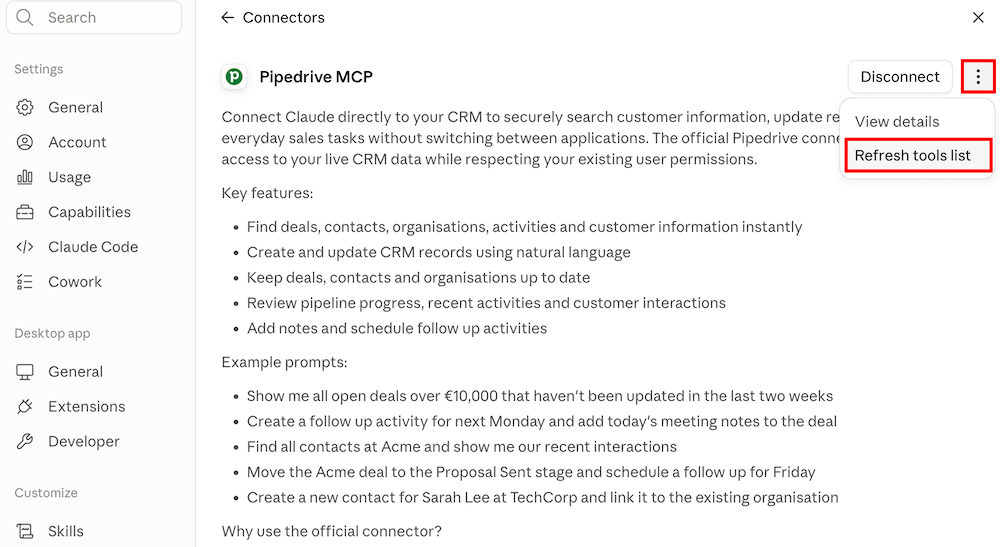
Once refreshed, the latest available Pipedrive MCP tools will be available in your connector.

Was this article helpful?
Yes
No