How can I see the total value of my deals?
JT
Last updated: September 3, 2026
Understanding the total value of your deals helps you prioritize work and forecast revenue more effectively.
Unlike individual deal values shown in the deal detail view, Pipedrive lets you see aggregated totals across your pipeline view and list view.
Note: Apply filters to customize which deals are included in your totals.
What deal value information is available
Wherever you view your deals, a summary box provides the same key information:
Field | Description |
|---|---|
Total value | Combined value of all included deals |
Number of deals | Total number of deals included in the view |
Value by currency | Breakdown of deal values by currency |
Weighted total value | Adjusted value based on stage probability or deal probability (if enabled) |
How to view total deal values
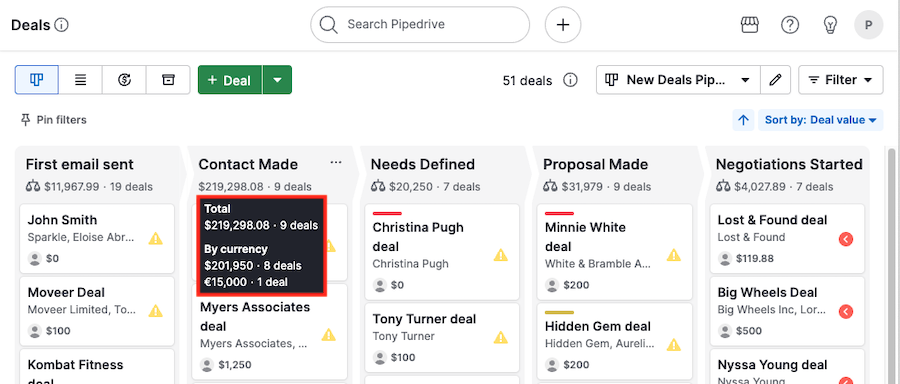
View by stage
Hover over a stage name in the pipeline view to see the total value for that stage.
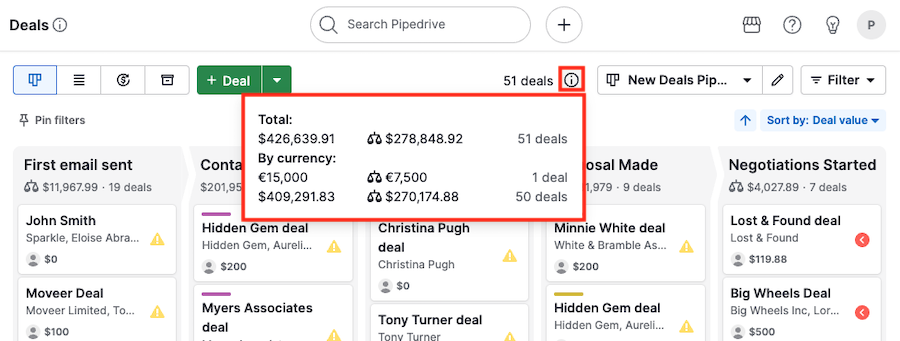
View by pipeline
Click the “i” icon next to the pipeline selection dropdown to see a summary of your entire pipeline.
View in the list view
In the list view, click the “i” icon next to the sync button to open the same summary as in the pipeline view.
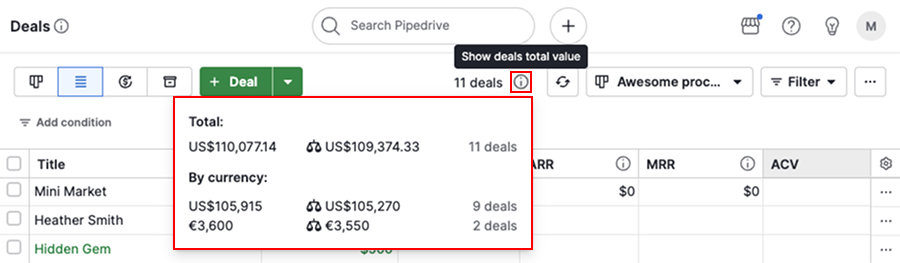
The displayed values reflect all deals currently shown in your filtered results.
Was this article helpful?
Yes
No