Pipedrive app for ChatGPT
Connecting ChatGPT to Pipedrive lets you access data and generate insights based on your Pipedrive activity.
This app links your OpenAI workspace with Pipedrive, so ChatGPT can access data from your account.
The app supports a sync mode, where part of your Pipedrive data is indexed in advance. This means ChatGPT can answer questions more quickly without needing to query Pipedrive in real-time, as the app syncs every 30 minutes.
ChatGPT is able to see data related to:
- Deals and leads
- Contact people and organizations
- Pipelines and stages
- Activities and activity types
- Email conversations
- Products
- Users and teams
- Custom fields, filters and saved views
- Automations
- Reports and insights
- Webhooks and integrations
Set up the Pipedrive app for ChatGPT
To connect Pipedrive to your ChatGPT workspace:
-
In the ChatGPT chat window, click your profile icon in the bottom-left corner. Then, click “Settings”.
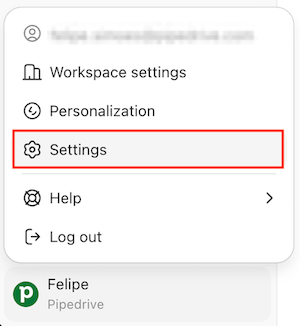
On the settings pop-up, click on the“Apps & Connectors” tab and browse for the Pipedrive app.

-
Once the Pipedrive app is selected, click the “Connect” button.

-
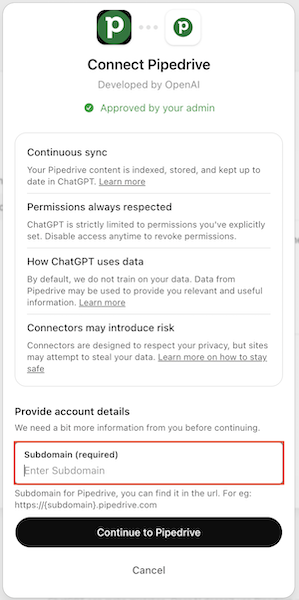
You’ll see a dialog box with more information about this specific app. Enter the subdomain of your Pipedrive company account and click “Continue to Pipedrive”.
Make sure you‘re logged in or log in using your Pipedrive credentials, choose the Pipedrive account you want to connect to and click “Allow and install”.
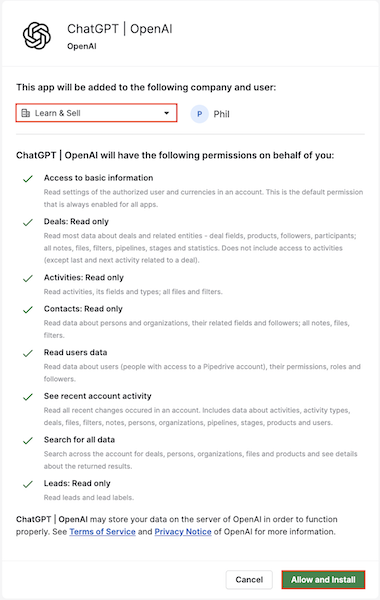
As soon as the connection is completed, you’ll be redirected to ChatGPT.
When the app is successfully installed, Pipedrive admins will get an email confirmation of this action.
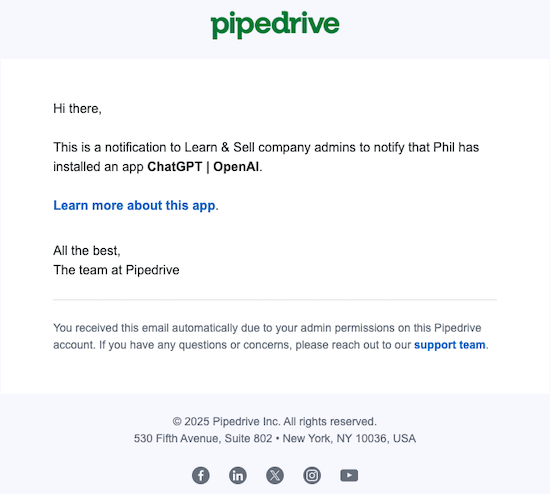
Sync Pipedrive with ChatGPT
Once you’re redirected to the installation pop-up, you’ll see the option to ”Enable Sync”.
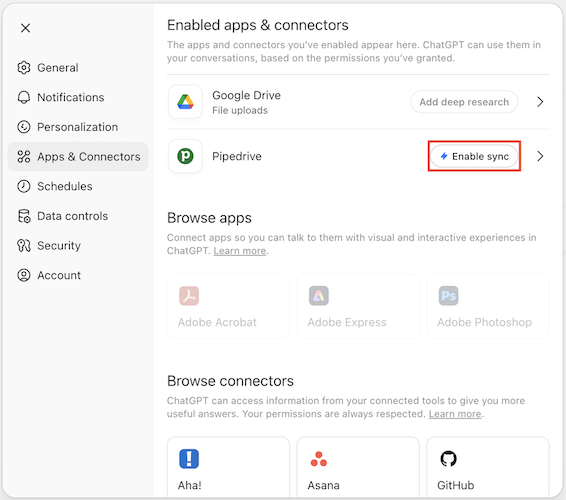
You’ll see a pop-up explaining what to expect from this sync. Simply click on ”Enable” to start syncing your Pipedrive account.
As soon as the sync finishes, you can start using the Pipedrive app.
To use ChatGPT with your company‘s information, click the “+” icon and select “Company knowledge”.
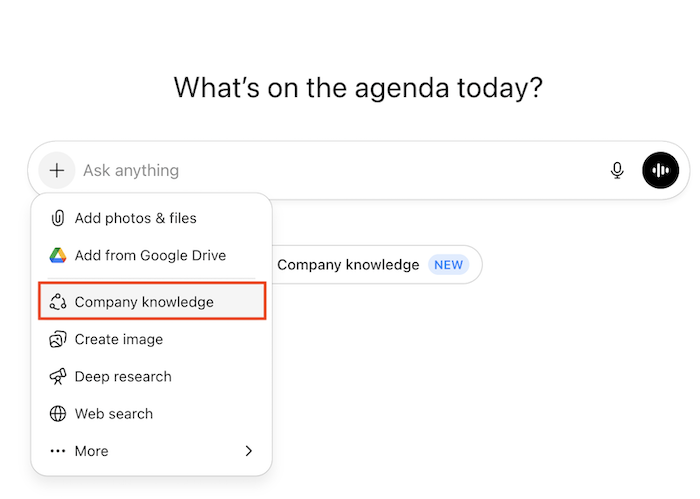
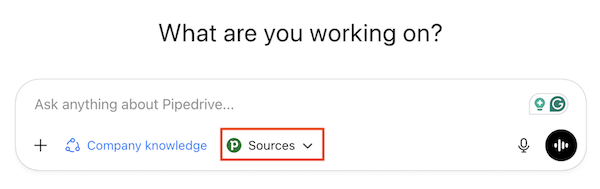
Then, choose Pipedrive as your source and start asking questions about your data.
Disable the Pipedrive app for ChatGPT
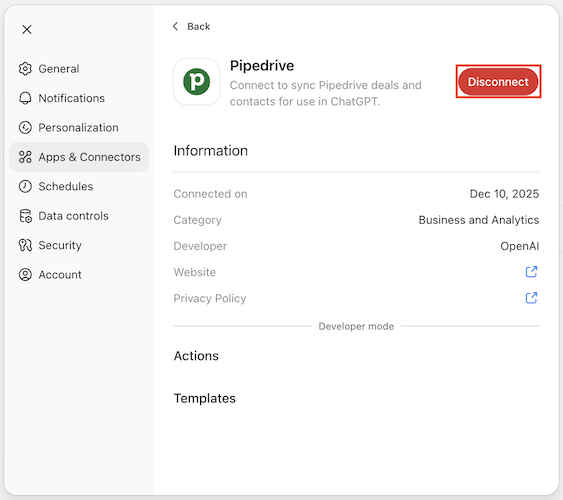
To disable the Pipedrive app, go to ”Settings”> ”Apps & Connectors”. Find the Pipedrive app and click ”Disable”.
Frequently Asked Questions
Is the Pipedrive app for ChatGPT available on all plans?
The app is only available to OpenAI business customers on the Business, Enterprise, Edu, or Pro plans and once enabled is available to all users regardless of their Pipedrive plan.
The sync feature is currently unavailable to customers who use EU data residency in ChatGPT. OpenAI may support additional data regions for sync apps in the future.
Will using ChatGPT affect my Pipedrive API limits?
Yes. Any data accessed by ChatGPT through the app will count toward your Pipedrive API usage limits.
The number of available API tokens depends on your company’s Pipedrive plan. You can learn more about usage limits in this article.
How does the Pipedrive app for ChatGPT handle user permissions?
The app automatically respects the user permissions defined in Pipedrive. ChatGPT will only be able to access the data that the connected user has permission to view in their Pipedrive account.
For example, a sales representative will only see the pipeline data for the deals to which they have access. If access is restricted for certain users or teams, ChatGPT will also be unable to view that data.
For more information on Pipedrive’s permission sets, please refer to this article.
Can users control which Pipedrive data ChatGPT can access?
Access is based on the Pipedrive user’s permissions at the time of connection. The app does not offer additional granular access settings beyond those already enforced in Pipedrive.
Only the ChatGPT user who connects to Pipedrive via OAuth will have access to the synced data, and that data is scoped according to their Pipedrive permissions.
Depending on user-specific permissions, ChatGPT is able to see data related to:
Deals | Open and closed deals, deal values, expected close dates, custom deal fields |
People (contacts) | Contact records, phone and email, associated notes and activities |
Organizations | Company records and linked people and deals |
Pipelines and stages | Pipelines and stages with their respective deals |
Activities | Tasks, calls, meetings, due dates, activity types and owners |
Notes | Notes attached to deals, people and organizations |
Email conversations | Synced emails, linked messages, mail threads per contact |
Files and attachments | Files attached to deals, people and organizations |
Products | Product catalog and product lines on deals |
Users and teams | Users in the organization, roles and permissions |
Custom fields and filters | Custom schema and saved list filters |
Automations | Automations, triggers, actions (if available to the API user) |
Reports and insights | Built-in reports and metrics (what’s exposed via your account and permissions) |
Webhooks and integrations | Configured webhooks and connected apps |
Can I revoke ChatGPT’s access to Pipedrive? What happens to my data?
Yes. You can disconnect ChatGPT from Pipedrive at any time via your app settings. Once disconnected, ChatGPT will no longer be able to access your Pipedrive data.
The synced data becomes unavailable shortly after disconnection and will be deleted automatically over time, in accordance with OpenAI’s data retention policy.
How long is Pipedrive data retained when used with ChatGPT?
Data retention is governed by the policies of OpenAI and any third-party tools used to enable the app.
For more information, see OpenAI’s Connectors in ChatGPT article, data controls FAQ, and privacy policy.
How is my CRM data kept secure when using this app?
Before using the Pipedrive app for ChatGPT, we recommend reviewing your company’s internal policies to ensure it aligns with your security and compliance standards.
To learn more about OpenAI’s security practices, see Admin Controls, Security, and Compliance in Connectors.
Where is my CRM data hosted when using the app?
The terms and data storage rules you have agreed with OpenAI will govern where and how your data is processed in ChatGPT.
Does OpenAI train on my data when I share it through the app?
OpenAI respects the training settings you have in your ChatGPT account. For details on how OpenAI handles data submitted through its API, please review OpenAI's API Data Usage Policy.
How does the sync with the app work? Is it one-way only or can ChatGPT make changes inside my CRM account?
The sync is one-way only, from Pipedrive to ChatGPT. No data from ChatGPT is added, edited or deleted in Pipedrive.
Byl tento článek užitečný?
Ano
Ne