Pipedrive Nova: record unscheduled calls
Record an ad hoc call in the Nova desktop app when you don’t have a scheduled or calendar-linked meeting.
Before recording
Unscheduled calls use the same permissions as scheduled meetings in Nova.
Before you record a call:
- Make sure all participants are aware that the meeting will be transcribed
- Follow applicable laws before starting the recording
- There is no maximum recording duration
Record an unscheduled call
To record an unscheduled call:
- In Nova, select “Record call”
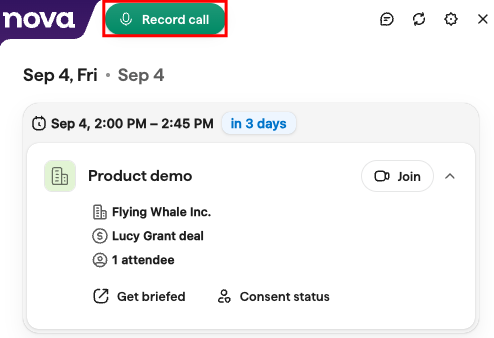
- Review “Confirm participant notice” and make sure all participants are aware that the meeting will be transcribed and that you have followed applicable laws
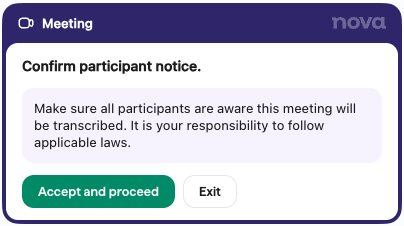
- Select “Accept and proceed” to start recording. If you don’t want to continue, select “Exit”
- When you’re finished recording, click the “Stop” icon
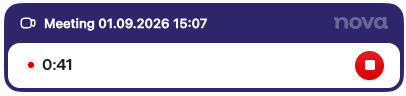
Nova can capture any audio available to Nova on your computer. You don’t need a scheduled or calendar-linked meeting to record the call.
After the call
After you stop recording, Nova completes the recording and transcription.

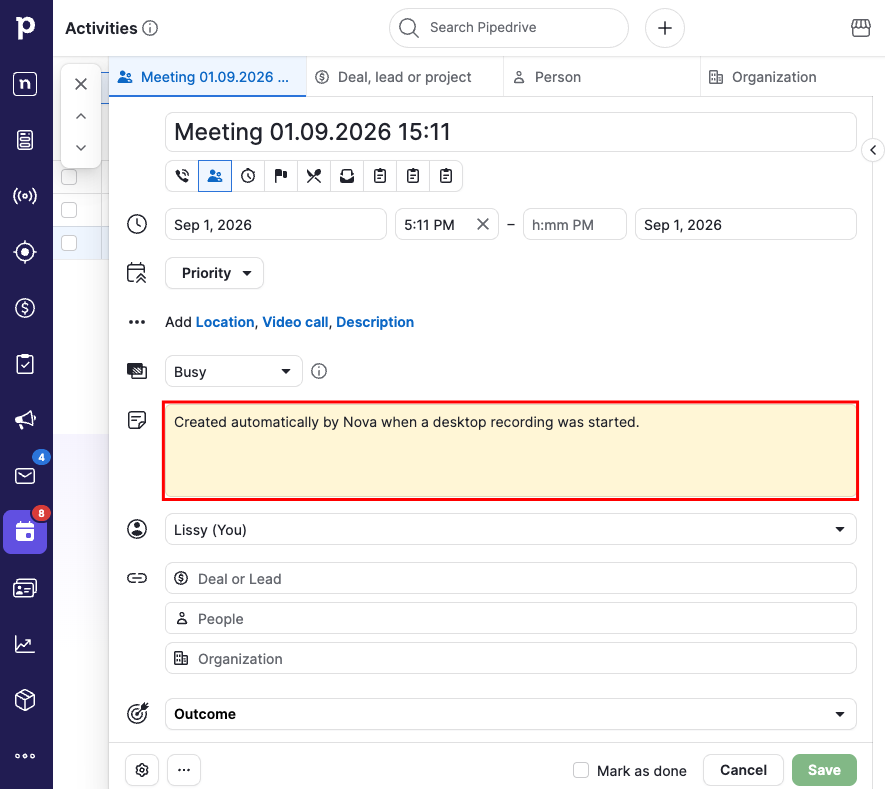
Nova then associates the recording with an automatically created Pipedrive activity.
Frequently asked questions
Does recording a call require a scheduled meeting?
No. You can use “Record call” without a scheduled or calendar-linked meeting.
Who can record unscheduled calls?
Access to unscheduled calls follows the same permissions as scheduled meetings in Nova.
What happens before recording begins?
After you select “Record call”, Nova shows “Confirm participant notice”.
Make sure all participants are aware that the meeting will be transcribed and that you have followed applicable laws. Then select “Accept and proceed” to start recording or “Exit” if you don’t want to continue.
Was this article helpful?
Yes
No