What happens to my billing when I deactivate a user in Pipedrive?
BF
Last updated: September 7, 2026
Note: This action is only available to users with account settings access. Learn more about global user management.
When you deactivate a user, a pop-up will appear showing the data assigned to that user and offering the option to remove the unused seat.
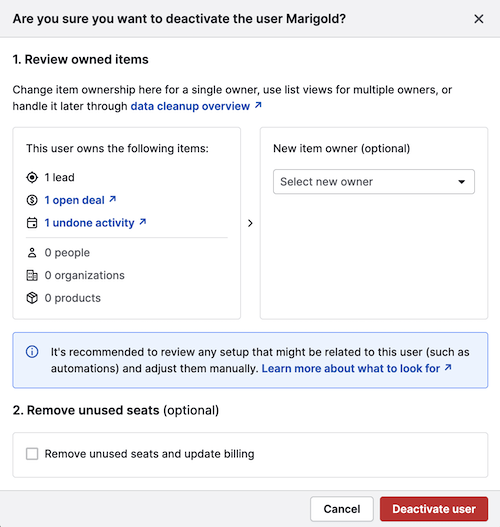
- If you remove this unused seat, the change will take effect at the beginning of your next billing cycle. If you add a new user to that seat before the new billing cycle, the seat will remain and won’t be removed.
- If you don’t remove this unused seat, it will remain in your account and your billing will remain unchanged
To remove seats for users who are already deactivated, open the account menu in the top-right corner and go to Billing > Manage subscription > Team size.
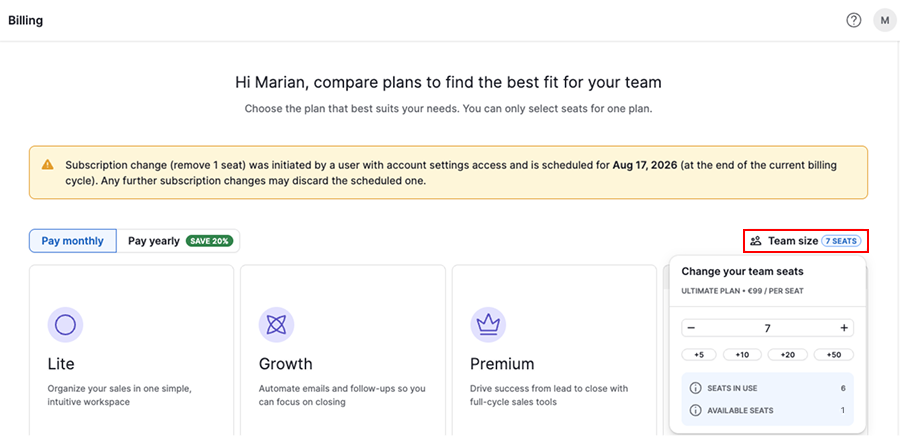
Note: If a seat is still assigned to an active user, you won’t be able to remove it.
Select the number of seats you’d like to have on your account.
Seat downgrades will take effect at the beginning of your next billing cycle. If you assign these seats to new users before the cycle starts, they won’t be removed.
Was this article helpful?
Yes
No