Pipeline view: how to prioritize deals
In the pipeline view, deals are arranged to help you understand what to work on next. By default, Pipedrive prioritizes deals based on activity, so you can focus on the most urgent opportunities.
If you want to adjust how deal information appears on each card or learn more about sorting options, you can read more in the deal card customization and sorting article.
Default deal priority
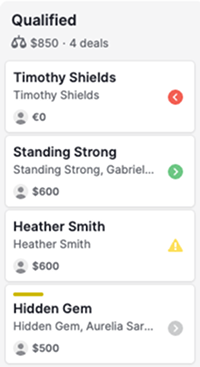
Deals in the pipeline view are sorted by their next activity date. Each deal card includes an indicator that shows its status and determines its position in the stage.
Indicator | Meaning | Priority |
|---|---|---|
Red arrow | Overdue activity | Very high |
Green arrow | Activity due today | High |
Yellow warning | No activities added | Medium |
Grey arrow | Future activities added | Low |
Deals that require immediate attention, like overdue or activities due today, are shown at the top. Deals without activities come next, while deals with future activities appear lower in the pipeline.
How to change deal priority
If you require a different focus, you can change how deals are prioritized by selecting a different sorting field.
Go to the Deals tab, open the pipeline view, and click the “Sort by” dropdown.
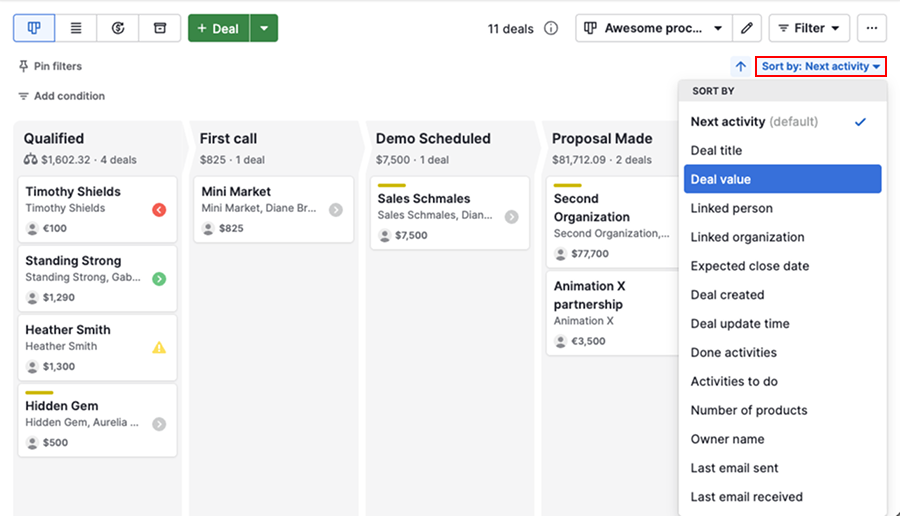
From there, choose a field such as deal value, expected close date, or owner.
The pipeline updates instantly, sorting deals by the selected criteria instead of activity priority.
When to use different prioritization methods
The default activity-based prioritization works well for day-to-day follow-ups and task management, as it keeps urgent deals visible.
Sorting by other fields can be useful in specific situations. For example, sorting by deal value can help you focus on high-revenue opportunities, while sorting by expected close date can highlight deals that are close to being won.
Was this article helpful?
Yes
No